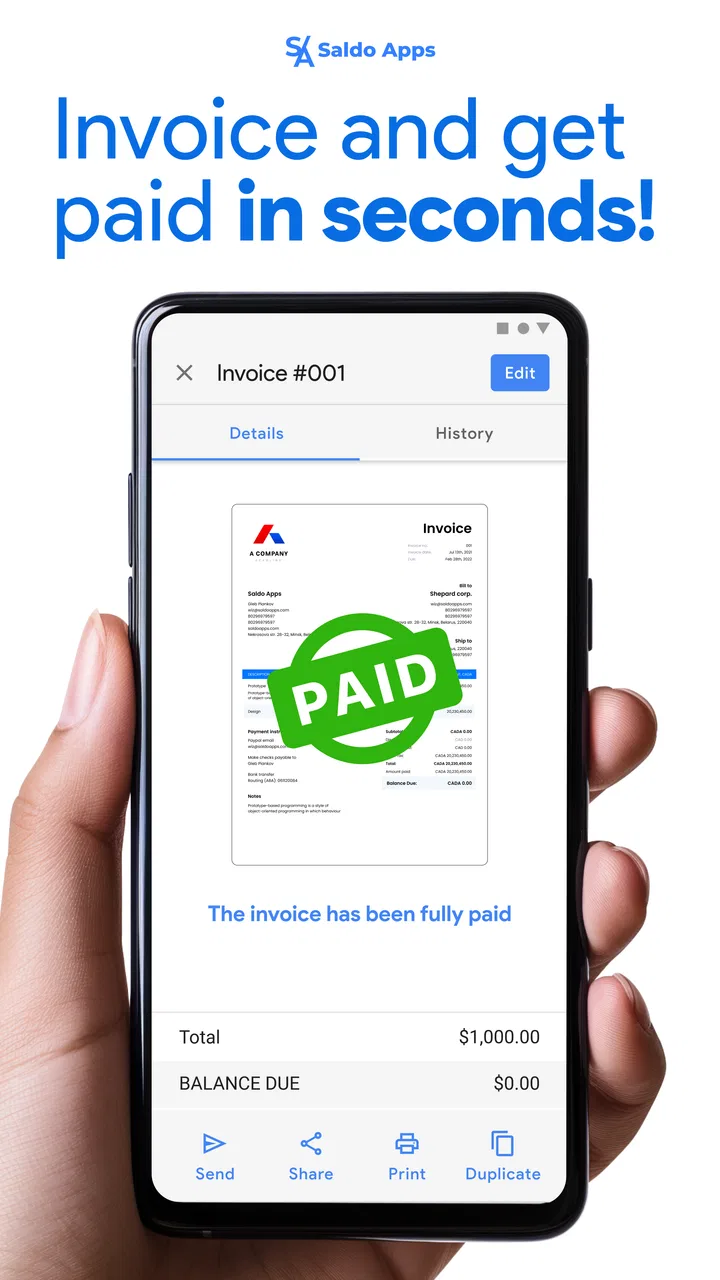
Saldo: Bill & Invoice Maker
- 4.7
- Rating
- 100.00K
- Installs
- Free
- Price

 Analysis by App-foxy
Running a small business often means creating an invoice at the least convenient moment: between appointments, from a customer’s driveway, or while you are away from your desk. Saldo: Bill & Invoice Maker is built for that mobile gap. I found it most useful as a straightforward business app for preparing simple invoices and estimates without opening a full accounting system.
That simplicity is both its appeal and its main boundary. If you want a quick document that looks organized and can be prepared from a phone, Saldo Apps has made a practical tool. If you expect complete bookkeeping, inventory control, tax management, or deep customer-accounting features, you may eventually need something broader. My experience with it is best summed up this way: it is a focused invoicing companion, not a replacement for every business-finance application.
Where the real friction appears during everyday use
The first thing I would tell a new user is not to judge the app by how quickly the first screen appears. The important work starts when you try to turn a blank invoice into a document that a customer can actually understand. The app’s purpose is clear, but the quality of the result depends on entering consistent business and customer details rather than rushing through the form.
You May Also Like

 Blood Strike: 2.5 Anniversary
Blood Strike’s Loadouts Turn Every Drop Into a Tactical Gamble
A close look at Blood Strike’s custom loadouts: how fast access to signature weapons reshapes its battle royale rhythm, rewards preparation, and narrows the gap between fights.

 Pandora - Music & Podcasts
Pandora’s Music Is Easy to Start, but Harder to Recover
Pandora’s strength is its low-effort path from a seed to a station. Its weak spot is how much confidence it asks you to place in connection, setup, and quiet recovery.

 8 Ball Pool
8 Ball Pool Is Built on Rivalries, Rematches, and Routine
A close look at the rivalries, rematches, shared routines, and unanswered safety questions that turn a quick pool match into a persistent mobile community.

 Samsung Music
Samsung Music’s Quiet Strength Is Playing What You Already Own
Its reach comes less from spectacle than from dependable access to a personal library. That simplicity is both the app’s strongest retention engine and its ceiling.

 AccuWeather: Weather Radar
AccuWeather Review: A Quick, Clear Forecast for Everyday Decisions
For everyday plans, the best forecast is the one you can understand quickly. AccuWeather makes rain timing, radar, and local conditions easy to act on, with a few trade-offs.

 Hill Climb Racing
Why Hill Climb Racing Still Turns Crashes Into One More Run
A tiny car, a bumpy hill and one more upgrade: Hill Climb Racing keeps resurfacing because its simple chaos makes every near-miss feel personal.
More From Our News Desk



That is where many people get stuck. A business owner may know the job total but still need to decide how to describe the service, whether to separate labor from materials, and how to write payment instructions. Saldo: Bill & Invoice Maker can help create the document, but it cannot decide what wording will prevent a later disagreement. I recommend preparing a small set of repeatable descriptions before using it regularly.
For example, a mobile cleaner could use separate lines for the standard visit, an additional room, and supplies. A freelance designer might separate the project deposit from the final delivery. A repair worker could distinguish the call-out charge, labor, and replacement part. This makes the invoice easier to check and gives the customer a clearer reason for the total.
The biggest practical improvement is consistency, not speed. When every invoice uses the same business name, service wording, and payment instructions, the app becomes much more valuable than a one-off document generator. I would treat the first setup session as the moment to establish a repeatable routine rather than simply trying to send the first bill.
Why estimates deserve more attention than they usually get
People often focus on invoices because they are connected to getting paid, but estimates are where misunderstandings can be prevented. I found the estimate side useful for turning an informal conversation into something the customer can review. It gives both sides a clearer reference before work begins.
A good estimate should make assumptions visible. If the final amount may change because materials, travel, or extra work are uncertain, I would say so in the description or notes rather than presenting one unexplained figure. Saldo is helpful for putting that information into a clean document, but the user still has to make the conditions understandable.
There is also a useful workflow distinction: an estimate is a planning document, while an invoice is a request for payment. Reusing the same wording without checking it can create confusion. Before turning an agreed job into a bill, I would review the line items, remove anything that was not completed, and confirm that the customer details are still correct.
Setup checks that prevent avoidable problems
On Android, the app supports devices running version 8.0 or later, so compatibility is an early check for anyone using an older phone. The current version is 4.3.3, and I would update before troubleshooting a problem that might simply come from running an outdated build. This is especially sensible if a screen behaves differently from what you expect or a document does not appear to generate correctly.
Next, I would check the basics inside the business profile and document fields. Make sure the business name is spelled exactly as you want customers to see it. Review contact details, currency presentation, customer names, and the wording of each service. A small typing mistake is easy to overlook on a phone and can make a professional invoice look careless.
I also recommend creating a low-stakes test document before using the app with a real customer. Use a clearly marked sample customer and a small imaginary service. Review the result from the customer’s point of view: can you tell who issued it, what was supplied, how much is due, and what action is expected? This test is more useful than merely checking whether a button works.
Another setup check is deciding where the app fits in your existing routine. If you already keep customer information in a notebook, spreadsheet, or accounting service, choose one place as the source of truth. Entering a customer differently in several places creates duplicate records and makes later checking harder. Saldo works best when it has a defined role instead of being used randomly alongside several competing systems.
The app is free to install, which makes trying this workflow easy. However, in-app purchases range from $4.99 to $119.99 per item, so I would review any purchase screen carefully before committing to an option. A free starting point is useful for testing whether the basic process suits your business, but the presence of optional paid items means you should decide what you actually need rather than purchasing simply because a feature looks convenient.
What I would prepare before the first serious invoice
- Service wording: write clear descriptions that a customer outside your trade can understand.
- Estimate rules: decide how you will explain uncertain materials, extra work, or changes in scope.
- Customer check: verify spelling and contact details before creating the final document.
- Review habit: inspect the finished document as if you were receiving it for the first time.
- Record keeping: decide where paid, unpaid, and disputed information will be tracked.
This preparation may sound basic, but it addresses the most common source of frustration: expecting the app to compensate for an unclear business process. It cannot turn vague job notes into a precise agreement automatically. What it can do is give those details a consistent place and make the final document easier to produce on the move.
Recovering when a document or workflow goes wrong
When a document or workflow goes wrong, I start by separating a content mistake from a phone or process hiccup; that keeps me from making duplicate drafts while trying to fix the first one. I also find it helpful to keep a brief note of what changed and which version is current, especially when a customer has already seen an estimate. That small habit makes the next correction easier to explain and review.
A simple recovery sequence
When an invoice does not look right, I would avoid immediately recreating it several times. First, return to the original customer and job details. Check whether the issue is a missing line, a mistaken quantity, an incomplete description, or an incorrect customer selection. Rebuilding without identifying the cause can leave multiple versions that are difficult to distinguish later.
If the screen seems stuck, close the current task and reopen the app after checking that the phone itself is responsive. Confirm that the app is current and that the device has enough free space for normal operation. These are general, low-risk checks that often separate a temporary phone problem from an error in the invoice content.
For a document with incorrect information, I would create a corrected version only after marking the earlier draft clearly in my own records. The important point is to avoid sending both versions to the customer. If the customer has already seen the first one, explain which document replaces it. The app can help you prepare the correction, but the communication around that correction remains your responsibility.
For estimates, recovery is slightly different. If a customer has accepted an estimate verbally but the document contains a wrong item, correct the document before treating it as the agreed scope. If the work has changed, do not quietly edit the old wording and assume everyone remembers the original. Prepare a clear updated version so the difference is visible.
When a missing result is a process problem
Sometimes users blame the app because a payment has not arrived after an invoice is sent. An invoice maker can prepare a request, but it does not make a customer pay, resolve a bank transfer, or settle a disagreement about the work. Before recreating the document, check whether the customer received it, whether the amount and instructions are clear, and whether the customer is disputing the service rather than the file itself.
The same applies to totals. If the amount looks wrong, inspect the individual service lines and quantities before assuming that the calculation system failed. A duplicated line or an extra material entry is a more ordinary explanation. This is one reason I prefer entering distinct items instead of putting a long paragraph and one combined total into the invoice.
There is a useful distinction between a document problem and a delivery problem. If the invoice looks correct on the phone but the customer cannot find it, the next step is to check the sending or sharing process you used, the recipient’s details, and whether the customer’s message service accepted it. If the document itself is incomplete, return to the line items and business information. Treating these as separate problems makes troubleshooting faster.
When the app is not the cause
A phone can introduce its own complications. A small display makes long descriptions harder to review, and autocorrect can alter names or service terms without making the mistake obvious. I would slow down for customer names, addresses, reference notes, and amounts. For important documents, reading every line aloud or reviewing it on a larger screen can catch errors that a quick glance misses.
Connectivity can also affect a mobile workflow, particularly when you are trying to complete a task in a busy location. If a screen fails to load or an action does not appear to finish, avoid tapping repeatedly. Wait, check the connection, and then confirm whether the document was actually created before trying again. Repeated taps can produce duplicate actions or simply increase confusion about what happened.
There is another non-technical cause: unclear responsibility inside a small team. If two people create invoices for the same customer without agreeing on numbering, wording, or status tracking, the resulting confusion may look like an app failure. Saldo is easier to manage when one person owns the final review or when the team follows a shared procedure for drafts and completed documents.
For a business that needs formal accounting records, reconciliation, recurring billing, detailed tax treatment, stock control, or multiple staff permissions, I would compare Saldo with a full accounting platform before making it the central system. A spreadsheet may be better for a very unusual pricing model, while dedicated accounting software may be better for reporting and compliance. Saldo’s advantage is the focused mobile task; its limitation is that focus.
Who will get the most from it
I think the app suits independent tradespeople, consultants, tutors, home-service providers, and small operators who mainly need to prepare estimates and invoices while away from a desk. It is also a sensible starting point for someone replacing handwritten bills with a more organized process but who is not ready for a large accounting suite.
A realistic example would be a photographer finishing a small event. Before leaving the venue, they can review the agreed service, add an extra hour if appropriate, and prepare a document while the details are still fresh. The useful part is not merely saving time; it is reducing the chance of forgetting what was delivered or sending a vague amount several days later.
I would be more cautious for a growing company with complicated approval chains or a large customer database. In that situation, the question is not whether Saldo can make an invoice, but whether it can support the whole administrative process you are building. A focused tool can become inconvenient when too many manual checks have to happen outside it.
The app is rated for Everyone, which fits its straightforward business purpose, and its reach is substantial, with over one hundred thousand installs. Its average rating is 4.7 from around one thousand one hundred ratings, while the published review count is around one hundred. I see those figures as encouraging signs of practical appeal, but they should not replace testing the workflow with your own type of business.
My practical verdict after using it as a mobile billing tool
Saldo: Bill & Invoice Maker is worth trying if your main need is clear, simple billing from a phone. I like that its purpose is narrow enough to understand quickly: prepare an estimate, create an invoice, and keep the process moving when a computer is not nearby. The strongest results come from users who bring organized service descriptions and a consistent review habit to the app.
I would not choose it as the only financial system for a business that needs advanced accounting oversight. I would also skip it if you want a tool to decide pricing, manage customer disputes, or replace careful record keeping. Those expectations are outside the useful core of a mobile invoice maker.
For everyone else, my advice is to install it, create a sample customer, prepare one estimate and one invoice, and then inspect the complete workflow before using it with a paying customer. Check how comfortably you can correct an error, distinguish drafts from final documents, and keep your own payment records. If those steps feel natural, Saldo Apps has produced a practical business companion with a gentle learning curve.
The free entry point makes that trial approachable, while the optional purchases mean I would move slowly through any upgrade decision. In the end, I would recommend it to a friend who needs mobile estimates and invoices without the weight of a full accounting package. I would simply add one condition: keep the app’s role clear, verify every document before sending it, and use a more comprehensive alternative when your business process grows beyond straightforward billing.
FAQs for Saldo: Bill & Invoice Maker
01What is Saldo: Bill & Invoice Maker used for?
Saldo: Bill & Invoice Maker is designed to help freelancers, small businesses, and independent professionals create and manage invoices, bills, estimates, and payment records from a mobile device. After reviewing its workflow, the app appears focused on simplifying routine billing tasks, organizing customer information, and producing professional-looking documents without requiring advanced accounting knowledge or complicated desktop software.
02Can I create professional invoices and customize them in Saldo?
Yes, Saldo generally allows users to prepare invoices by entering business details, customer information, products or services, prices, taxes, discounts, and payment terms. Depending on the version and subscription plan, customization options may include templates, logos, colors, numbering, and notes. Before relying on a specific feature, check the current app listing because available designs and editing tools can vary between free and paid versions.
03Does Saldo: Bill & Invoice Maker support estimates, receipts, or other documents?
The app is intended to cover more than basic invoice creation. Users may be able to prepare estimates or quotes, convert accepted estimates into invoices, record payments, and generate receipts or related billing documents. This can be useful for keeping a simple sales workflow in one place. However, the exact document types and conversion options may depend on the platform, region, and plan you choose.
04Can I send invoices to customers and receive payments through Saldo?
Saldo can help users share completed invoices with customers through common mobile sharing methods, such as email, messaging applications, or downloadable document files. Some versions may also provide payment-related tools or links, but the app should not automatically be assumed to process every payment method. Review transaction fees, supported currencies, payment providers, and availability in your country before using it for customer payments.
05Is Saldo: Bill & Invoice Maker free, and is my business data secure?
The app may be available to download at no initial cost, while certain templates, exports, unlimited documents, advanced features, or cloud services can require a subscription or in-app purchase. Pricing and trial conditions should be checked in the relevant app store. Because invoices contain customer and financial information, also review Saldo’s privacy policy, backup options, account requirements, and data-handling practices before storing sensitive business records.
Pros
- Creates professional invoices and bills quickly from a mobile device.
- Useful templates help maintain a consistent business image.
- Tracks payment status to make outstanding balances easier to follow.
- Suitable for freelancers
- small businesses
- and independent contractors.
- Mobile access lets you manage billing tasks while away from the office.
Cons
- Advanced features may require a paid subscription or in-app purchase.
- Some users may need time to learn the app’s billing workflow.
- Customization options may be limited compared with desktop accounting software.
- Cloud-based features depend on a stable internet connection.
- It may lack the full bookkeeping and tax tools of dedicated accounting platforms.

Saldo: Bill & Invoice Maker
Gallery